Activating your AI Agent in Gorgias
Last updated: July 13, 2026
Now that Gorgias is connected, you need to route tickets to the AI team and configure your Engaige Agent to pick them up, either in Autonomous or Agent Assist mode.
Step 1: Create the Routing Rule in Gorgias
First, you must tell Gorgias which tickets should be processed by the AI. We do this by creating a Rule that assigns specific tickets to the AI Agent Team (which was automatically created during setup).
In Gorgias, go to Settings -> Ticket Management -> Rules.
Click Create Rule.
Scroll down and click on Create Custom Rule.
Name it something similar to
Assign to Engaige Team.Set the Rule conditions as the screenshot below.
You can also select other ticket channels than "Email" if you'd like the AI agent to pick up tickets on other channels.
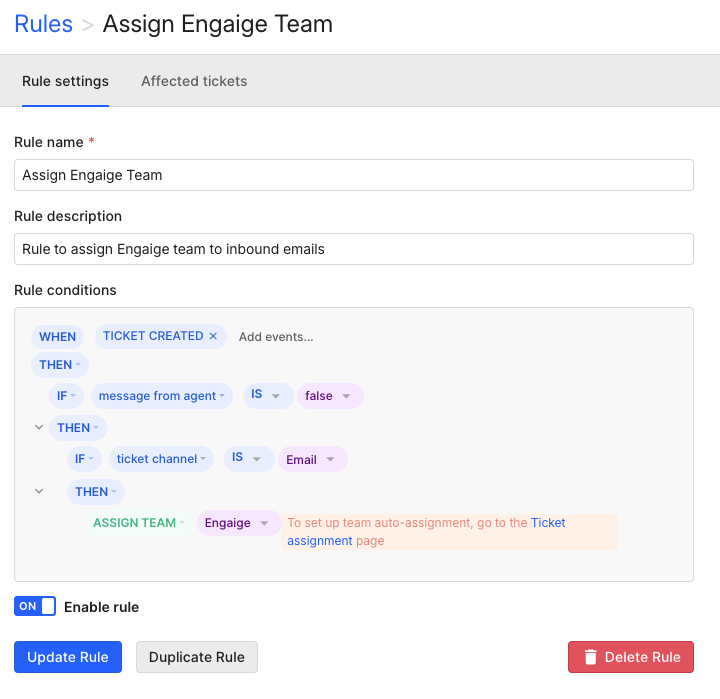
Any new ticket coming from your selected channels will now be instantly assigned to your AI Agent for processing.
This rule is meant to be a basic rule to start to route all tickets of selected channels to the Engaige team. If you want to customize it more, feel free to do so. You can refer to Gorgias' Rule article.
Step 2: Configure Triggers in Engaige
Now that tickets are landing in the right team, you must tell your specific Engaige AI Agent to listen to that team.
Go to AI Agents in Engaige and click on your existing Agent.
Click on the Triggers tab.
At Support Queue, select the team you used in the rule above (e.g., Engaige Agent Team).
This tells the AI: "Watch this team. When a ticket arrives here, answer it."
Click Save.
Step 3: Configure Handover Settings for Autonomous agent
If the autonomous AI agent cannot answer a question (e.g., no policy matches), it needs to know where to send the ticket for a human to review.
In the same Agent screen, click on the Handover tab.
Under "Handover Team", select the specific Gorgias team where human agents work (e.g.,
Support TeamorCS General).Click Save.
Success! Your integration is live. New tickets matching your rule will move to the AI team, the Agent will process them, and if it gets stuck, it will move them to your Handover team.
AI Agents in Agent Assist mode do not need a handover team. You will only assign agent assist agents to a support team.