Connecting Dixa
Last updated: February 20, 2026
Connect your Dixa helpdesk to let your AI Agent handle conversations, draft responses, and resolve customer inquiries automatically.
You will need Admin access to your Dixa environment to complete this setup.
Important: Dedicated Engaige User Email
Before starting, you must create a dedicated email address for the Engaige agent, which must be created and managed by the customer, not by Engaige.
Make sure no other people log-into this e-mail address, as this might result in the Engaige user being logged-out and inactive in Dixa.
Step 1: Create the Engaige Agent in Dixa
Log in to your Dixa dashboard with your own Dixa profile.
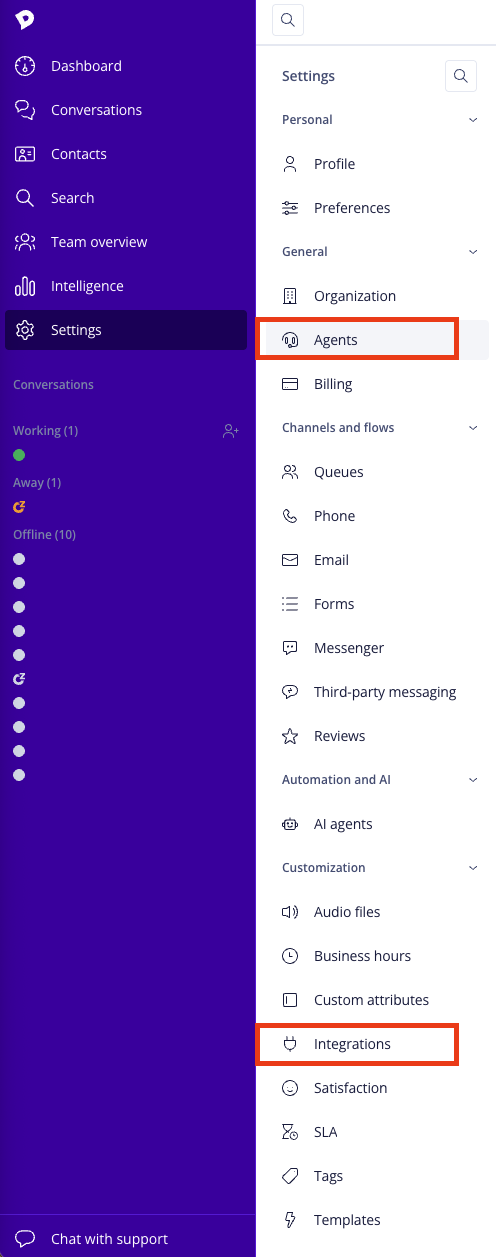
Go to Settings → Agents.
Click Add Agent.
Enter:
Name (this name might be visible to customers. Add a name to your liking)
Email (the dedicated email you created)
Optional: Add an avatar
Assign Admin role to this user.
Save the agent. This user will be used for the integration.
Step 2: Generate Your Dixa API Token
To connect Dixa to Engaige, you need an API token.
In Dixa, go to Settings → Integrations.
Open API Tokens.
Click Add API Token.
Enter a name (example:
Engaige API Token).Create the token. You will now see the API key.
Step 3: Enable Dixa in Engaige
Open your Engaige Dashboard.
Go to Settings → Integrations.
Find the Dixa card/integration.
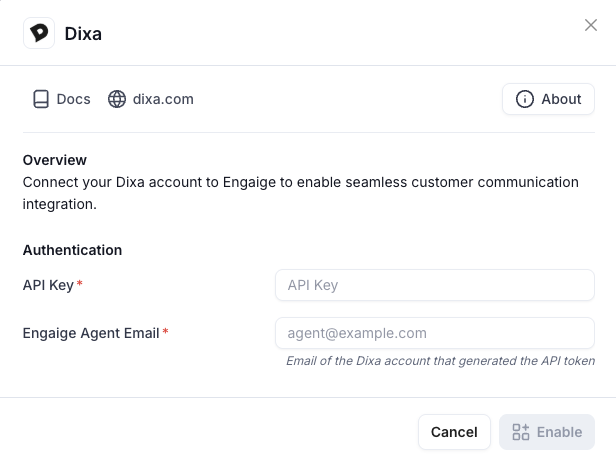
Click Enable. A configuration modal will appear.
Fill in:
API Key: Paste your Dixa API token
Agent Email: Paste the dedicated Engaige agent email
Click Enable. After clicking Enable, Dixa may take 1–2 minutes to process the connection. Do not refresh or close the browser until you see a success or error message. This delay is Dixa-specific.
If successful, you will see a confirmation message.
At this stage, the integration is connected, but the AI agent is not yet active. To activate your AI Agent fully in Dixa, follow this guide.